TeamViewer 7 For Linux Released

12:17 AM

teamviewer 7 linux

Quick update: the latest TeamViewer 7 for Linux* (application for remote control and desktop sharing) has finally been released today, after being in beta for over a month.

The new Linux version brings support for online meetings and presentations with up to 25 participants, a screenshot tool and more. Check out our previous post on TeamViewer 7 beta For Linux. The Windows version (which has been available for about 2 months)  release notes can be found here.

Download TeamViewer 7


* Even though TeamViewer is packaged as a .deb or .rpm, it's not a native Linux application and it actually uses Wine (comes bundled with the TeamViewer package).

0 comments

» read more....

TeamViewer 7 Beta Available For Linux [Remote Desktop Tool]

1:33 AM

teamviewer 7 linux

TeamViewer is an application for remote control, desktop sharing and file transfer between computers, great for meetings, presentations, support and more. It runs on Windows, Mac OSX, Linux (even though it comes in a .deb or .rpm, it uses Wine which comes bundled with it) as well as Android or iPhone. The application is free for personal use only.


TeamViewer 7 for Windows was released about a month ago and the new version is now finally available for Linux too (TeamViewer was already available for Linux, but I'm talking about version 7). Here's what's new in TeamViewer 7:
  • enhanced multi-monitor support
  • an integrated screenshot tool
  • record presentations
  • save connection settings per Computer (store individual connection settings for each computer in your Computers & Contacts list) - see the first screenshot in the post
  • instant meeting (you can start your meeting even before adding any participants - ideal for preparation and testing)
  • scheduled meetings
  • mobile participation via Android / iOS client
  • File Box (make files available for download during meeting)


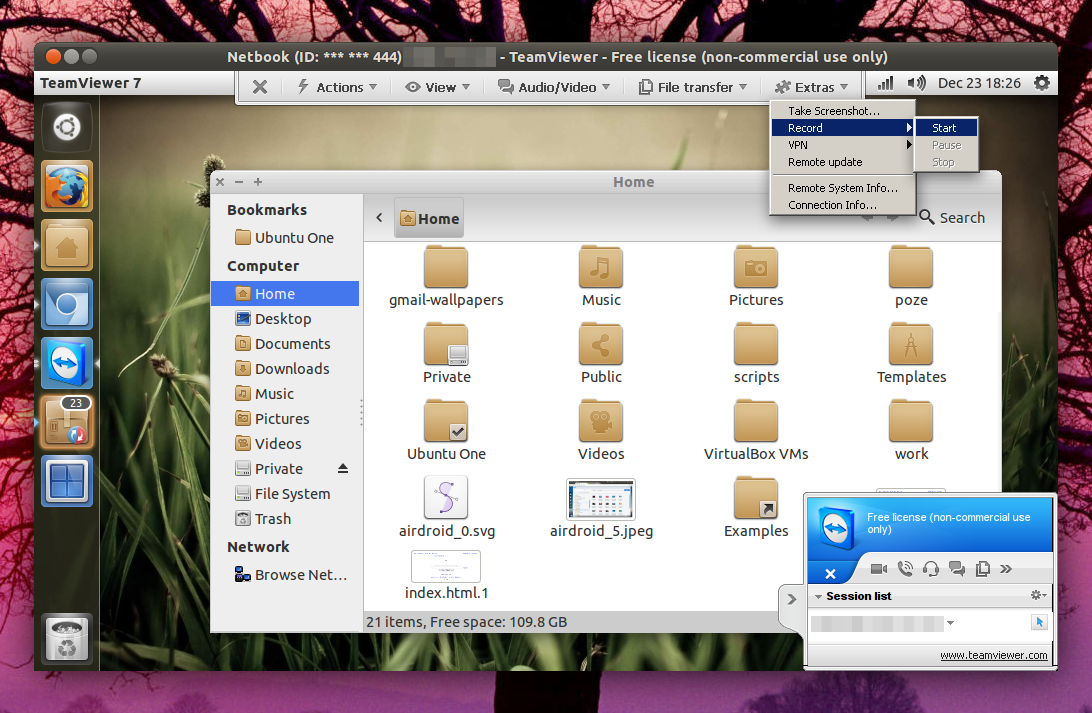
The new recording / take screenshot features are available under Extras:

teamviewer 7 linux


New instant meeting in TeamViewer 7:

teamviewer7 ubuntu

Unfortunately, some of the new TeamViewer 7 for Windows features are not yet working on Linux. For instance, you can record and play a presentation using TeamViewer under Linux, but the built-in AVI converter doesn't work, the TeamViewer panel can't be moved and so on, but this is a beta so hopefully all these bugs will be fixed in the final version.

Besides the new features, it's also important that TeamViewer 7 is finally available for Linux because you can connect to any TeamViewer version using TeamViewer 7, however, you can't connect to TeamViewer 7 using an older version.


Download TeamViewer 7 beta for Linux (also available as a stable version for Windows, etc.). Update: TeamViewer 7 for Linux is out of the beta and is now considered stable.


Also see: Mikogo: Cross-Platform Desktop Sharing And Web Conferencing Tool

0 comments

» read more....

Google Releases Cross-Platform Remote Desktop Extension For Chrome

6:06 PM

Chrome remote desktop

Google has released a remote desktop extension for Chrome. The extension works everywhere Chrome does (including Chrome OS and Chromium) and is as easy to use as it gets: there are no settings and you only have to enter an access code and you're ready to go.


Even though this is a Chrome extension, you'll be able to control the entire remote computer and not just the web browser, just like you can using regular desktop applications such as TeamViewer or Mikogo. There is one thing I miss in Chrome Remote Desktop though: since this is a Chrome extension, you can't access your desktop using an Android device. But I'm sure it's just a matter of time until Google will provide a compatible Android app (or maybe Chrome for Android).


chrome remote desktop


Chrome Remote Desktop can be used to provide remote help or connect to your own computer remotely, however, someone must provide the access code if you want to connect to your own computer. But according to the extension page, "additional use cases such as being able to access your own computer remotely are coming soon".


In my test, the extension worked great and there was almost no lag when connecting to either a Linux or Windows remote computer. The extension is easy to install and use, but there are missing features like sending keyboard shortcuts to the remote computer, file sharing and many others. But it's still in beta and Google says more features are coming.


Important: for now, the extension doesn't work if you log in using a @googlemail.com account instead of @gmail.com. But there is a work-around - see HERE. (thanks to Carmelo Scollo for the tip!)


Download Chrome Remote Desktop BETA


[via lffl.org]

0 comments

» read more....

Mikogo: Cross-Platform Desktop Sharing And Web Conferencing Tool

5:18 PM

Mikogo linux

Mikogo is a freeware, cross-platform desktop sharing tool. Starting with the latest version 4 - released a few days ago -, Mikogo is also available for Linux, in addition to the already existing Windows and Mac clients. There is also a web client but it lacks most of the Mikogo features so it can only be used for viewing.

Mikogo can be used for web conferencing, online meetings, presentations or remote support and comes with built-in file transfer and chat features. It doesn't come with native audio conferencing but it does support it through regular phone calls. For more info, see the Mikogo audio conferencing page.

What's really cool about Mikogo is that multiple participants can join a session and you can easily switch who has the control or which desktop is used for the presentation. There's also a a built-in recording tool so you can easily record your sessions.

Just like in TeamViewer, the connection is made based on a conference number so you don't have to know the IP address of any of the participants. This is an important feature because it makes using Mikogo a lot easier and works even if multiple computers share the same public IP.

Also, since security is important, you'll be glad to know that Mikogo uses 256-bit AES encryption for the desktop client and the Mikogo website uses 128-bit SSL encryption.

The Linux version of Mikogo still needs some work: the remote keyboard combinations feature doesn't work yet and the user interface doesn't integrate too well with the desktop. Also, some features are unfortunately only available for Windows, such as the whiteboard or the option to adjust the speed / quality. But this is the first Linux release so hopefully these features will be available in the Linux client soon.

You're probably wondering about the speed: well, it my test (I've only tested it on Linux!), Mikogo was kind of slow, compared to, let's say TeamViewer. But this may be related to my Internet connection so I can't really give a verdict here. But Mikogo comes with a lot of cool features so you should really give it a try - if you do, let us know how it works for you!


Download Mikogo - to use Mikogo on Linux, download the archive, extract it and double click the "mikogo" executable.

Thanks to Genbeta for the news!

0 comments

» read more....