5:04 PM
In GNOME Shell 3.2 you can reply to chat from the popup notifications, but that only works for Empathy by default. So here is a GNOME Shell extension that does the same thing but for Pidgin.
Pidgin GNOME Shell extension is easy to install but to make it even easier (and also get updates without having to run a bunch of commands), I've uploaded it to the WebUpd8 GNOME3 PPA.
Add the PPA and install Pidgin GNOME Shell extension in Ubuntu 11.10 Oneiric Ocelot using the following commands:sudo add-apt-repository ppa:webupd8team/gnome3
sudo apt-get update
sudo apt-get install gnome-shell-extensions-pidgin
Also install GNOME Tweak Tool if you haven't already:
sudo apt-get install gnome-tweak-tool
If you don't use Ubuntu or don't want to use our GNOME3 PPA, install it manually using the following commands (firstly make sure GIT is installed):
cd
git clone https://github.com/kagesenshi/gnome-shell-extensions-pidgin.git
mkdir -p ~/.local/share/gnome-shell/extensions/pidgin@gnome-shell-extensions.gnome.org
cp gnome-shell-extensions-pidgin/* ~/.local/share/gnome-shell/extensions/pidgin@gnome-shell-extensions.gnome.org/
Once installed, restart GNOME Shell (press ALT + F2 and enter "r" or log out and log back in), then activate the extension using GNOME Tweak Tool (shows up as "Advanced settings" in the Activities "menu").
Tip: to avoid getting both the standard Pidgin notifications and the new ones, in Pidgin select Tools > Plugins and uncheck the box next to "Libnotify Popups".
» read more....
1:42 AM
By default, Pidgin saves all your passwords in plain text (look under
~/.purple/accounts.xml). About four years ago there was a
bug report that asked to encrypt the passwords, but the developers marked the bug as "wontfix". Update: you can read about the reasons behind this,
here.
Here's where Pidgin Gnome Keyring plugin comes in: this plugin will make Pidgin store your passwords in the Gnome Keyring. One note though: the plugin will not prevent other plugins from writing passwords in the accounts.xml file (I don't use any such plugins so I can't give you an example).
Installation
1. For Ubuntu 11.04 Natty Narwhal, use the commands below:
sudo add-apt-repository ppa:pidgin-gnome-keyring/ppa
sudo apt-get update
sudo apt-get install pidgin-gnome-keyring
For other Ubuntu versions (
you need Pidgin 2.7.x or newer!), you can download the Pidgin Gnome Keyring .deb:
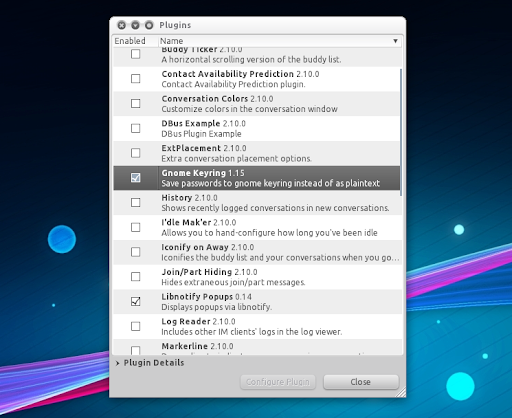
2. Once the plugin has been installed, open Pidgin (if it was running, restart it) and enable the "Gnome Keyring" plugin under Tools > Plugins and then restart Pidgin:
Important note: sometimes the passwords are still saved in plain text the first time you start Pidgin (after enabling the plugin) - if this happens, restart Pidgin. To see if the Pidgin Gnome Keyring plugin is actually working you can look under ~/.purple/accounts.xml and see if your passwords still show up in plain text - they shouldn't. Hopefully this will be fixed in the future.
If you're not using Ubuntu, you can get Pidgin Gnome Keyring plugin via Google Code.
» read more....
9:30 PM
I'm sure many of you know about
GetDeb but maybe some of our new readers don't. GetDeb is a very popular (for example,
in July 2010, there were about 25144 unique Ubuntu Lucid users per day installing packages via) software portal that comes with an Ubuntu repository which you can use to install applications that are not available in the official Ubuntu repositories - this includes updated versions for various applications.
Until now I didn't really needed to use GetDeb in Ubuntu 11.04 Natty Narwhal, but the
Pidgin PPA hasn't been updated yet with the latest Pidgin 2.8.0 (released about 3 days ago) so I though I'd check GetDeb - and indeed, GetDeb provides the latest Pidgin 2.8.0 (for Ubuntu Natty and Lucid - no Maverick it seems) as well as VLC 1.1.10 (for Natty only).
So if you want to upgrade to the latest Pidgin and VLC (as well as many other applications like FileZilla, Unetbootin, etc.),
download this .deb file and install it - this will add the GetDeb repository -, then run an upgrade:
sudo apt-get update
sudo apt-get upgrade
» read more....