Google Stops Supporting Picasa For Linux

3:17 AM

picasa for linux

Picasa for Linux isn't a native Linux application and instead, it uses WINE which comes bundled with it (so the user doesn't have to install WINE), though it does have some tweaks to make it integrate better with Linux. Well, even this Wine Picasa for Linux has been deprecated by Google.

Users who have already downloaded Picasa for Linux can continue to use it, but there will be no further updates and also, Picasa for Linux can no longer be downloaded it via http://picasa.google.com/. For now, the application is still available in the Google Ubuntu repository though.

We launched a WINE-based version of Picasa for Linux in 2006 as a Google Labs project. As we continue to enhance Picasa, it has become difficult to maintain parity on the Linux version. So today, we’re deprecating Picasa for Linux and will not be maintaining it moving forward. Users who have downloaded and installed older versions of Picasa for Linux can continue to use them, though we won’t be making any further updates.


The last Picasa for Linux version is 3.0, while Picasa for Windows has already reached version 3.9 and even though the Windows version is not officially supported on Linux, you can still use it and even get the Google+ integration working - see our Install Picasa 3.9 In Linux And Fix Google Sign In Issue [Wine] post for more info.

Thanks to Emmet McPoland for the tip!

0 comments

» read more....

Google Tasks Indicator: Quick Access To Your Google Tasks From The Ubuntu Panel

4:42 PM

Google Tasks Indicator

Google Tasks Indicator is a new appindicator that displays your 10 most recent Google tasks on the Ubuntu panel.

For now, Google Tasks Indicator supports adding new tasks, marking tasks as completed (or unmark them) and clearing completed tasks. This is the first version, released for testing purposes, so there are still things not yet ready, like editing tasks, selecting the list, configuring the number of tasks displayed and so on, but these features should be available soon. Also, for now Google limits the Google Tasks Indicator API to 5000 hits per day, but hopefully this limit will be increased.

Google Tasks Indicator uses OAuth2 so your credentials are not stored locally. The first time your run Google Tasks Indicator, a new tab opens in your web browser, prompting you to grant Google Tasks Indicator access to your tasks. After this, Google Tasks Indicator should start and display your 10 most recent Google tasks.

From its preferences, you can set if the application should start automatically when you log in and the icon theme used.

If you want to use Google Tasks Indicator with a different Google account, you'll have to revoke the access for the currently logged in user via Google account settings.


Install Google Tasks Indicator


To add the Atareao PPA and install Google Tasks Indicator in Ubuntu 12.04 Precise Pangolin or 11.10 Oneiric Ocelot, use the following commands:
sudo add-apt-repository ppa:atareao/atareao
sudo apt-get update
sudo apt-get install google-tasks-indicator

0 comments

» read more....

Install Picasa 3.9 In Linux And Fix Google Sign In Issue [Wine]

8:48 PM

picasa 3.9 linux google plus share

Picasa 3.9 was released a while back and among the new features are: share pictures to Google Plus, Picasa name tags for Google Plus, new photo editing effects and side by side editing.

Unfortunately, logging in to your Google account using Picasa 3.9 doesn't work by default in Linux, either using the regular Picasa 3.9 Wine installation or the more advanced installation that makes Picasa integrate with GNOME:

  • simply installing Picasa 3.9 using Wine: when you click the "Sign in with Google Account" link, you get a blank window
  • installing Picasa 3.0 via Google repository and then merging it with Picasa 3.9: the login window displays a "One moment please" message and never gets past it

But there is a fix for the Picasa 3.9 sign in bug! The "trick" is simply to install Internet Explorer 6 using Winetricks, which is required because Picasa 3.9 uses Google OAuth. Without IE6, the login window stays blank.


Install Picasa 3.9 in Linux (using WINE) and fix the Google sign in issue


picasa 3.9


1. Install Wine and Winetricks. For Ubuntu, use the commands below:
sudo apt-get install wine winetricks

For older Ubuntu versions (like 10.04) which don't have Winetricks available in the repositories or other Linux distributions, install Winetricks using the following commands:
cd
wget http://winetricks.org/winetricks
sudo mv winetricks /usr/local/bin/
sudo chmod +x /usr/local/bin/winetricks

2. Install Picasa 3.9:
cd && wget http://dl.google.com/picasa/picasa39-setup.exe
wine picasa39-setup.exe

3. To be able to login to your Google account using Picasa 3.9, you must install Internet Explorer 6 via Winetricks by running the following command:
winetricks ie6

If you get an error (link not found) and the Internet Explorer 6 setup doesn't start, you can manually download Internet Explorer 6 from HERE (click the "Internet Explorer 6 (full)" link). Then, place the downloaded "ie60.exe" file under the ~/.cache/winetricks/ie6/ folder (".cache" is a hidden folder in your home directory so press CTRL + H to see it). And finally, run:
winetricks ie6

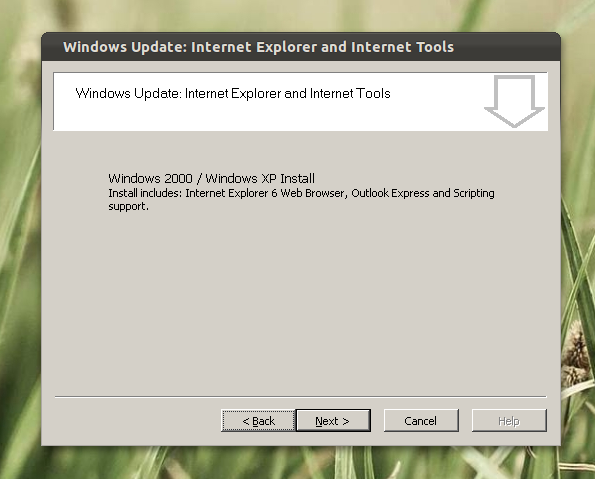
Now the Internet Explorer setup should start:

ie6 winetricks


Once you finish the installation, run "Picasa 3" from the menu / Dash. Now click the login link on the Picasa top right corner - the Google/Picasa login should now work.

Please note that the login window is initially blank and will probably stay like that for a few seconds - don't close it, if you've done everything as stated above, you should see the Google login page soon.


Update (thanks to Dragos for the tip!): you can also use this for the old Picasa installation guide which provides desktop integration. Just follow that guide, install Winetricks and instead of running "winetricks ie6", use the following command:
env WINEARCH=win32 WINEPREFIX=~/.google/picasa/3.0/ winetricks ie6

0 comments

» read more....